🚀 Getting Started & Master Data Configuration
This guide walks the school timetabling committee through the essential first steps in Eurario, from authentication and multi-school isolation to detailed master data management.
1. Authentication & Role-Based Access Control (RBAC)
Eurario incorporates an institutional access control system designed to safeguard sensitive educational data in compliance with GDPR standards:
flowchart TD
    User["Teacher / Committee Member"] -->|"Google Login"| OAuth["Google Workspace OAuth 2.0\n(@school.edu)"]
    OAuth --> Check["User Verification in Database"]
    Check -->|"First Access"| Pending["Status: PENDING\nAdministrator Notification"]
    Pending -->|"Admin Approval"| Approved["Status: ACTIVE\nRole: Admin / Editor / Viewer"]
    Check -->|"Already Approved"| Session["Create Secure HTTP-Only Cookie Session"]
Session --> App["Access Eurario Dashboard"]- Google Workspace Single Sign-On: Users authenticate using their official institutional accounts (e.g.
name.surname@school.edu). No local passwords need to be set or maintained. - Protected Registration Workflow: When logging in with Google for the first time, accounts are placed in
pendingstatus. The system administrator receives an alert in the administration console and can approve access with the appropriate permissions (admin,editor,viewer). - Standalone / Demo Mode: If
GOOGLE_CLIENT_IDis omitted in the Docker environment, Eurario automatically activates standalone mode, granting immediate access to the default school without requiring cloud tokens.
2. Multi-School Architecture (Multi-Tenant)
Eurario natively supports multiple independent schools inside a single running instance:
- Strict Data Isolation: Each school's data is housed in its own isolated directory under
data/<school_id>/, containingproject.json, historical snapshots (snapshots/), and the latest solved timetable (solved_timetable.xml). - Instant Switching: Through the Schools dropdown in the top navigation bar, authorized administrators can switch between institutes or spin up a new blank school dataset.
- Optimistic Concurrency Control (OCC): Every database mutation increments a
data_versioncounter. If two committee members simultaneously modify data for the same institution, Eurario intercepts the conflict, prevents data overwrite, and presents a visual comparison modal showing the concurrent changes.
3. Buildings & Rooms Management
Before defining classes and teachers, physical school spaces must be configured:
A. School Buildings (Plessi)
For institutions operating across multiple sites (e.g., Main Campus and Branch Campus):
* Building Name: Official name of the campus.
* Short Code: Brief identifier (e.g., C for Central, B for Branch), rendered on timetable cards and teacher boards.
* Travel Time: Estimated travel duration in minutes between buildings. FET uses this parameter to prevent scheduling back-to-back lessons across different campuses without sufficient commuting time.
B. Rooms & Laboratories (Rooms)
- Room Name: e.g.
Room 101,Computer Lab 1,Main Gymnasium. - Associated Building: Physical campus location.
- Student Capacity: Maximum seating capacity. Eurario checks student headcount against room capacity.
- Room Type: Standard, Gymnasium, Computer Lab, Science Lab, Art Studio.
- "Lab or Gym" Flag (
is_lab_or_gym): Flags the room as a limited-availability, shared facility for the timetable solver and print templates.
4. Classes & Articulated Groups
Classes represent the student groups for which FET will generate a continuous, gap-free weekly schedule.
A. Standard Class Parameters
- Class Name: Standard denomination (e.g.,
1A,2B,3CSA,5BL). - Student Headcount: Number of enrolled students (used for room capacity validation).
- Home Room (
base_room): Default regular classroom permanently assigned to the class (ConstraintStudentsSetHomeRoom). - Default Building: The home campus of the class.
- Weekly Schedule Presets: Quickly apply standard high school schedules (5-day or 6-day week schedules, automatically barring afternoon periods or configuring required afternoon return sessions).
B. Articulated Classes & Subgroups
For courses where a class splits into multiple tracks (such as second foreign languages or technical specializations):
* Subgroups / Articulations: Eurario creates linked child entities (e.g., 3A_FRA and 3A_SPA for French and Spanish, or 4A_MECH and 4A_AUTO for technical tracks).
* Simultaneous Scheduling: During articulated hours, both subgroups attend class during the very same period in separate rooms without generating schedule conflicts for the parent class.
5. Subjects & Print Abbreviations
Subject management in Eurario balances pedagogical requirements with typographic print considerations:
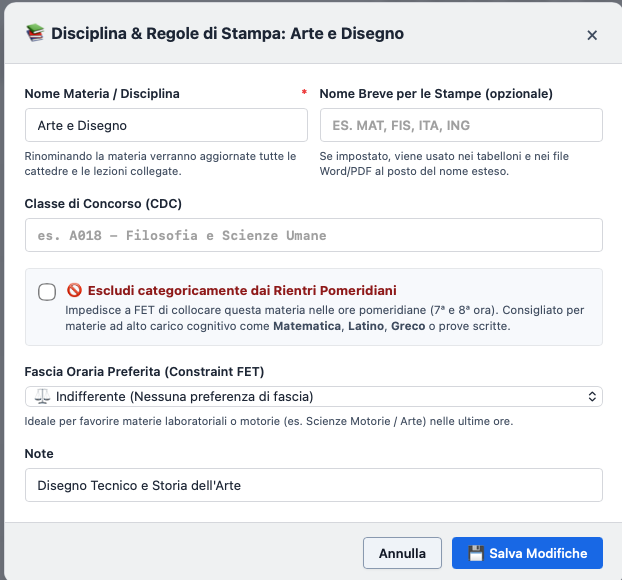
Detailed Subject Parameters:
- Full Name: Complete academic title (e.g., Natural Sciences, Chemistry and Biology).
- Print Short Name (
short_name): Optional compact label for official printouts. When provided (e.g.,MATH,PHYS,SCI,ENG), it is rendered in Word (.docx) and PDF timetable cells, avoiding awkward line breaks. If omitted, Eurario automatically generates a smart abbreviation. - Competition Code (CDC): Reference ministerial code (e.g.,
A012,A027,A048). - Preferred Time Slot (
pref_hours): PRIME: Prioritizes scheduling during periods 1 to 3 (ideal for written tests, math, and high-focus subjects).ULTIME: Favors late morning or afternoon periods (ideal for Physical Education, art, and practical labs).INDIFFERENTE: No specific time preference.- Afternoon Exclusion (
no_rientri): Hard constraint prohibiting the subject from 7th or 8th period afternoon slots.
6. Teacher Profiles & Contractual Rules
Every teacher profile in Eurario is linked to strict contractual rules:
- Full Name & Short Label (
short_name): Eurario automatically generates the official typographic initials for compact boards (e.g.,ROSSI M.,BIANCHI L.). - Contract Workload (
target_hours): - Standard full-time schedule: 18 hours/week (in secondary education).
- Part-time contracts: 8, 9, 10, 12, 14, or 15 hours/week.
- Contract Type (
contract_type):intera(full),part-time,spezzone(hour block). - Active Working Days (
min_days&max_days): - Full-time: typically 5 days per week (with 1 day off out of 6).
- Part-time: computed automatically based on workload (e.g. 9 hours over 2-3 days; 12 hours over 3-4 days).
- External Shared Schedule (COE - Cattedra Orario Esterna):
- Active
is_coeflag. - External school completion hours (
coe_hours) and designated external working days (coe_days). - Eurario deducts external hours from the internal target and strictly blocks external days in the solver XML.
- Allowed Buildings (
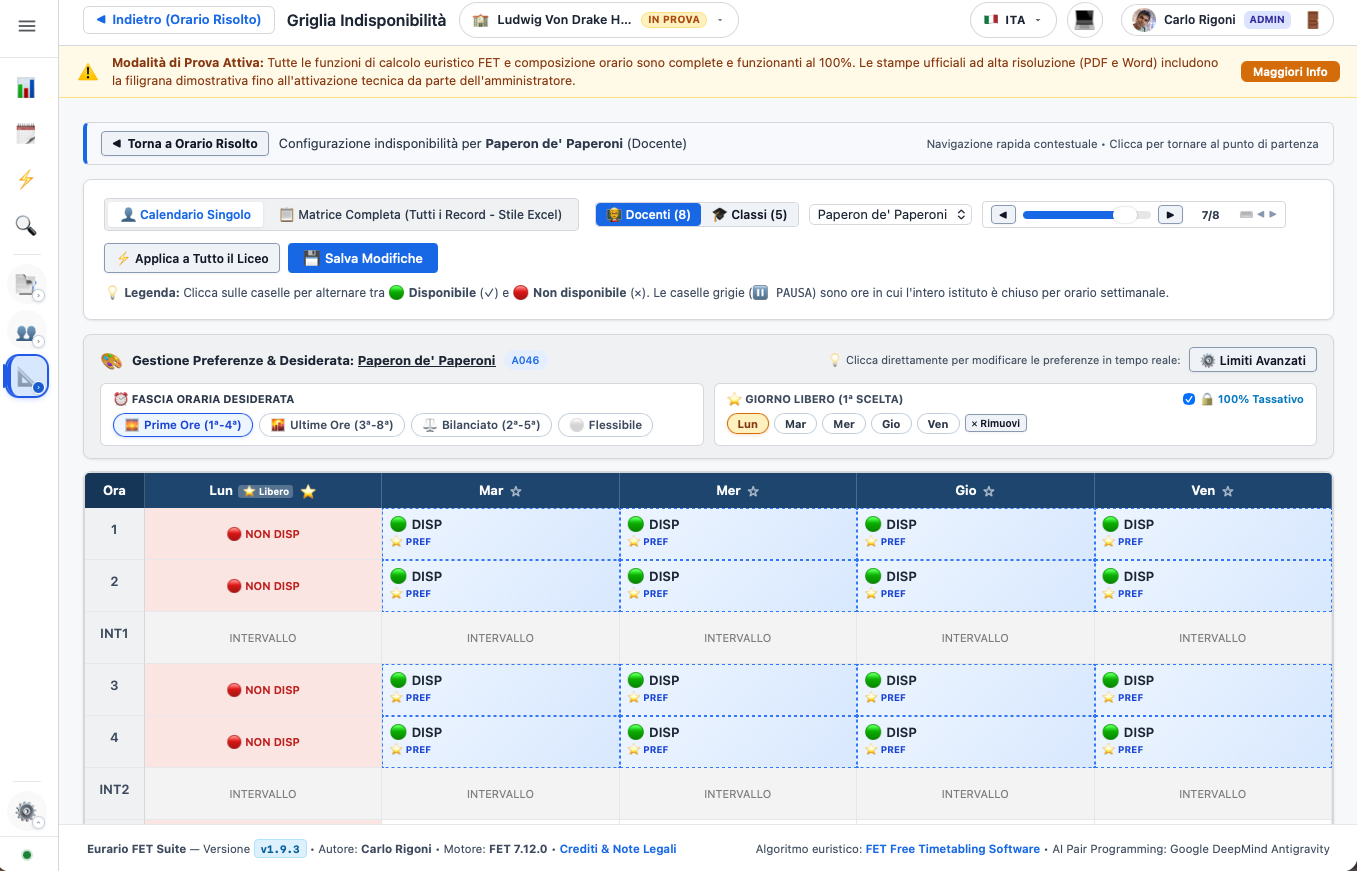
allowed_buildings): Restricts the teacher to specific campus locations. - Interactive Unavailability Matrix:
- Weekly grid (days x hours) to toggle contractual days off or specific periods unavailable for administrative tasks.
- FET converts these selections into 100% hard constraints (
<ConstraintTeacherNotAvailableTimes>).
7. Automated Organico Ingestion from Excel or Word
Instead of entering hundreds of teacher assignments manually, Eurario includes a powerful data ingestion engine:
flowchart LR
    File["Staffing File\n(.xlsx / .docx)"] --> Parser["Eurario Semantic Parser\n(Header & Table Scanner)"]
    Parser --> Matcher["Alignment Engine\n(Diff against current database)"]
    Matcher --> DiffModal["Visual Diff Modal\n+ Added Teachers\n~ Modified Allocations\n- Removed Rows"]
    DiffModal -->|"User Confirmation"| AutoSnapshot["Automatic Pre-Import Snapshot"]
AutoSnapshot --> Apply["Atomic Database Update"]- Excel (
.xlsx) and CSV Import: Ingestion of structured spreadsheets with standard columns (Teacher, Competition Code, Class/Group, Subject, Weekly Hours). - Official Word (
.docx) Model: Download a preformatted Word template, complete it with the administration, and upload it directly. - Pre-Import Integrity Check (
analyze_cattedre_alignment): - Highlights added teachers in green, modified hours in yellow, and deleted assignments in red.
- Validates total class hours against curriculum standards (e.g., 27h/week for early scientific high school, 30h/week for senior years).
- Automatic Safety Snapshot: Automatically creates a rollback point ("Pre-Import Organico") before applying batch updates.